How to Respond to Google Reviews Automatically (Without Sounding Like a Robot)
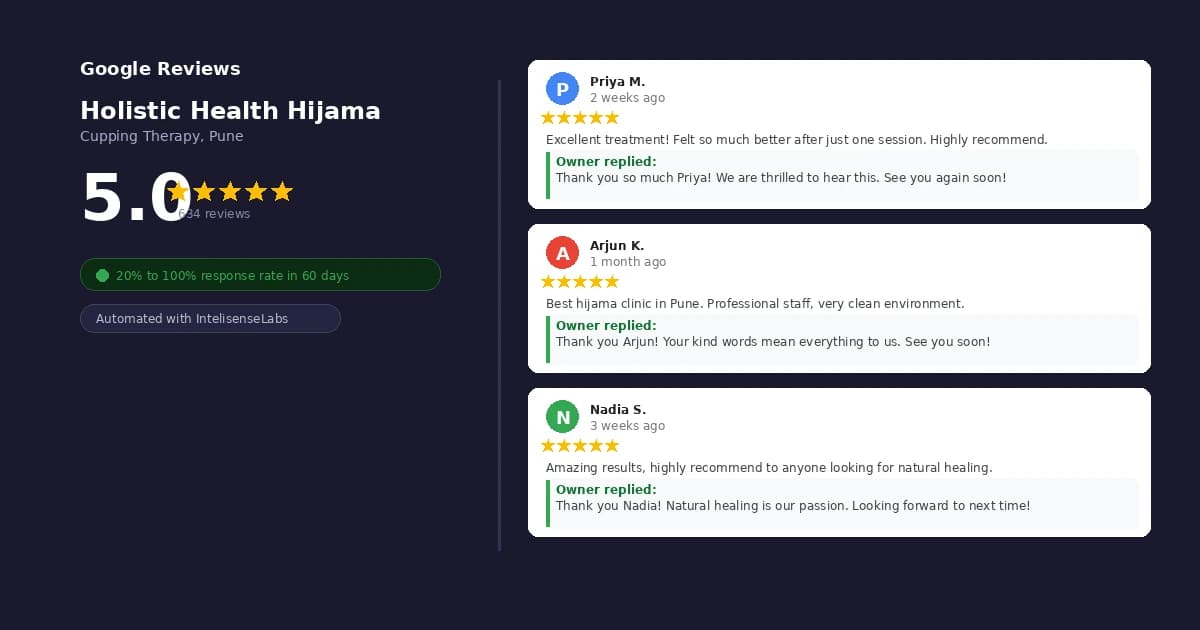
Every week, patients leave reviews on your Google Business Profile. They took time out of their day to tell the world your clinic helped them.
Most clinics don't respond.
Not because they don't care — but because no one has time to log into Google, find the review, think of something meaningful to say, and type it out. And when you have 10 new reviews a week, that's 10 tasks that keep getting pushed to tomorrow.
This is a common problem for small clinics.
Here's how automated review responses work — and how you can set them up for your clinic.
Why Responding to Google Reviews Actually Matters
Before we get into the how, let's be clear on the why.
It affects your local SEO. Google has confirmed that responding to reviews signals to their algorithm that your business is active and engaged. Clinics that respond consistently tend to rank higher in local search results over time.
It converts browsers into patients. When someone searches for a hijama clinic, acupuncture centre, or physiotherapy practice near them, they read reviews before calling. A clinic with 50 reviews and responses to all of them looks far more professional than a clinic with 200 reviews and silence.
It builds trust publicly. Your response isn't just for the reviewer. Every potential patient who reads that review also reads your reply. A warm, personal response shows your clinic cares — even after the appointment is over.
It protects your reputation. When the occasional negative review appears, a prompt and professional response can turn a damaging moment into a trust-building one. Silence, on the other hand, looks like guilt.
For most owners, understanding why it matters is not the problem. Execution is. Between managing appointments, staff, treatments, and inventory, responding to reviews often doesn't happen consistently.
The Manual Method (And Why It Falls Apart)
The standard advice is to set aside 15 minutes a day to respond to reviews. Log into Google Business Profile, click Reviews, find the unanswered ones, type a response.
This works in theory. In practice, here's what happens:
- Day 1: You respond to everything. Feels great.
- Day 4: You forget.
- Week 2: You have 8 reviews stacked up. It feels like a task now.
- Month 2: You've responded to 30% of reviews and the rest feel too old to touch.
This isn't a discipline problem. It's a systems problem. Manual processes that depend on a person remembering to do them will always break down — especially in a busy clinic environment.
The solution isn't trying harder. It's removing the human dependency entirely.
How Automated Google Review Responses Work
A typical automated setup uses a simple pipeline:
Step 1 — Review Detection When a new review is posted on your Google Business Profile, the system detects it within minutes using the Google Business Profile API.
Step 2 — Review Classification The review is classified by star rating and sentiment. A 5-star review praising the treatment gets a different response template than a 3-star review mentioning a wait time issue.
Step 3 — AI Response Generation An AI model drafts a personalised response based on the review content. It references specific details the patient mentioned — the treatment type, how they felt, what they said — so the response never sounds generic.
Step 4 — Human-in-the-Loop Approval (Optional) For clinics that want full control, we add a Telegram approval step. The owner gets a message. Example (illustrative): "New 5-star review from Priya M. — here's the draft response. Approve?" One tap and it's posted. This keeps the human voice without the manual workload.
Step 5 — Auto-Post The response is posted directly to Google via the API. The reviewer gets notified. The public sees a responsive, caring business.
A common setup is automatic posting for 4 and 5-star reviews, with human approval required for anything below 4 stars. This means the owner only needs to intervene on the rare occasion something needs a more careful reply.
Setting This Up for Your Clinic
The technical setup requires access to the Google Business Profile API, an automation platform (we use n8n for our clients), and an AI API for generating responses. For most clinics, setting this up from scratch takes 2–3 days of development work.
The key things to get right:
Tone calibration — The AI needs to write in your clinic's voice, not a generic customer service voice. This requires feeding it examples of how you'd naturally respond, your clinic name, and specific phrases to use or avoid.
Response variation — Repeating the same response to every 5-star review will be flagged by Google and looks robotic to readers. The system needs enough variation that no two responses are identical.
Negative review handling — This is where most automated systems fall down. Negative reviews need a different approach: acknowledge the issue, don't get defensive, offer to resolve it offline. We always route these through human approval.
Review monitoring — You should still get a weekly summary of what's being said about your clinic, even if you're not responding manually. Patterns in feedback are valuable clinical and business intelligence.
Is This Right for Every Clinic?
If you're getting fewer than 5 reviews per month, manual responses are probably fine. Set a calendar reminder and do it weekly.
If you're getting 10 or more reviews per month — which is common for any wellness clinic running at reasonable capacity — the manual approach will eventually break down. Automation isn't a luxury at that point, it's a maintenance decision.
This approach suits clinics and local service businesses across India and the UK. If you want to see what this would look like for your business specifically, book a free 30-minute call and we'll map it out.
No sales pressure. Just a clear picture of what's possible and what it would take to build it.
Real Results
See how we've done this for real businesses.
Selected case studies. Real numbers. No invented results.
View Case StudiesWant this for your business?
Book a free 30-minute call. We identify exactly where automation saves you the most time.
Book a Free Call